Rental space reservation system

top_image

SHERPACE Rental Space Reservation System

From facility management to reservations and billing, manage every aspect of your space operations in one place.

What is SHERPACE?

SHERPACE is a cloud-based reservation management system designed to streamline the management of rental spaces, meeting rooms, event spaces, and other space rental businesses.

It brings everything needed for space operations into one platform, including multi-facility management, real-time reservations, automated invoicing, customer management, and payment tracking.

Because it is web-based, no special software installation is required.

With an internet connection, you can access SHERPACE anytime, anywhere from a PC, smartphone, or tablet.

SHERPACE Features

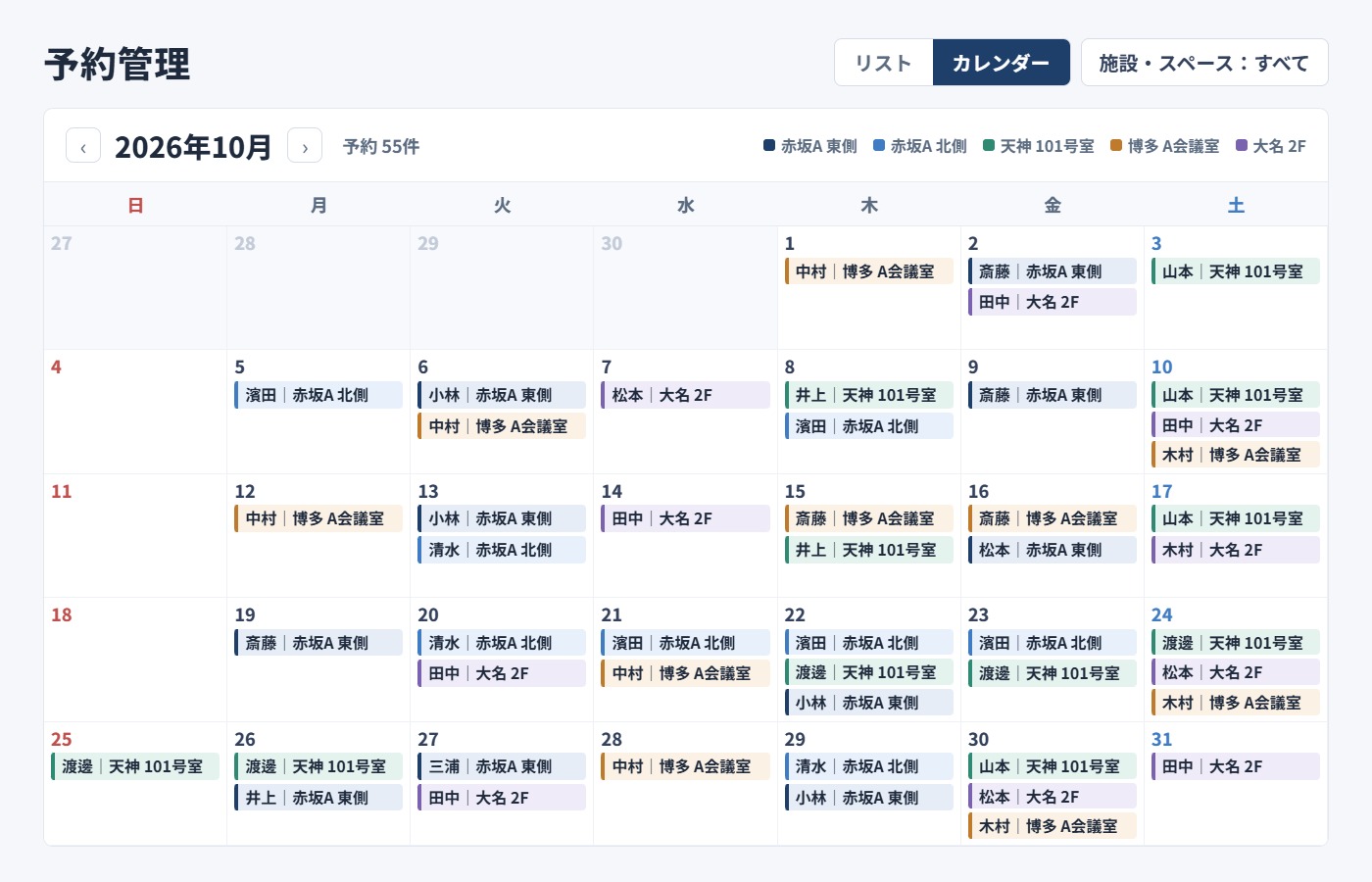
Reservation Calendar

Supports hourly and daily bookings

Reservation calendar icon

View booking availability in monthly and daily calendars. Double bookings are automatically prevented.

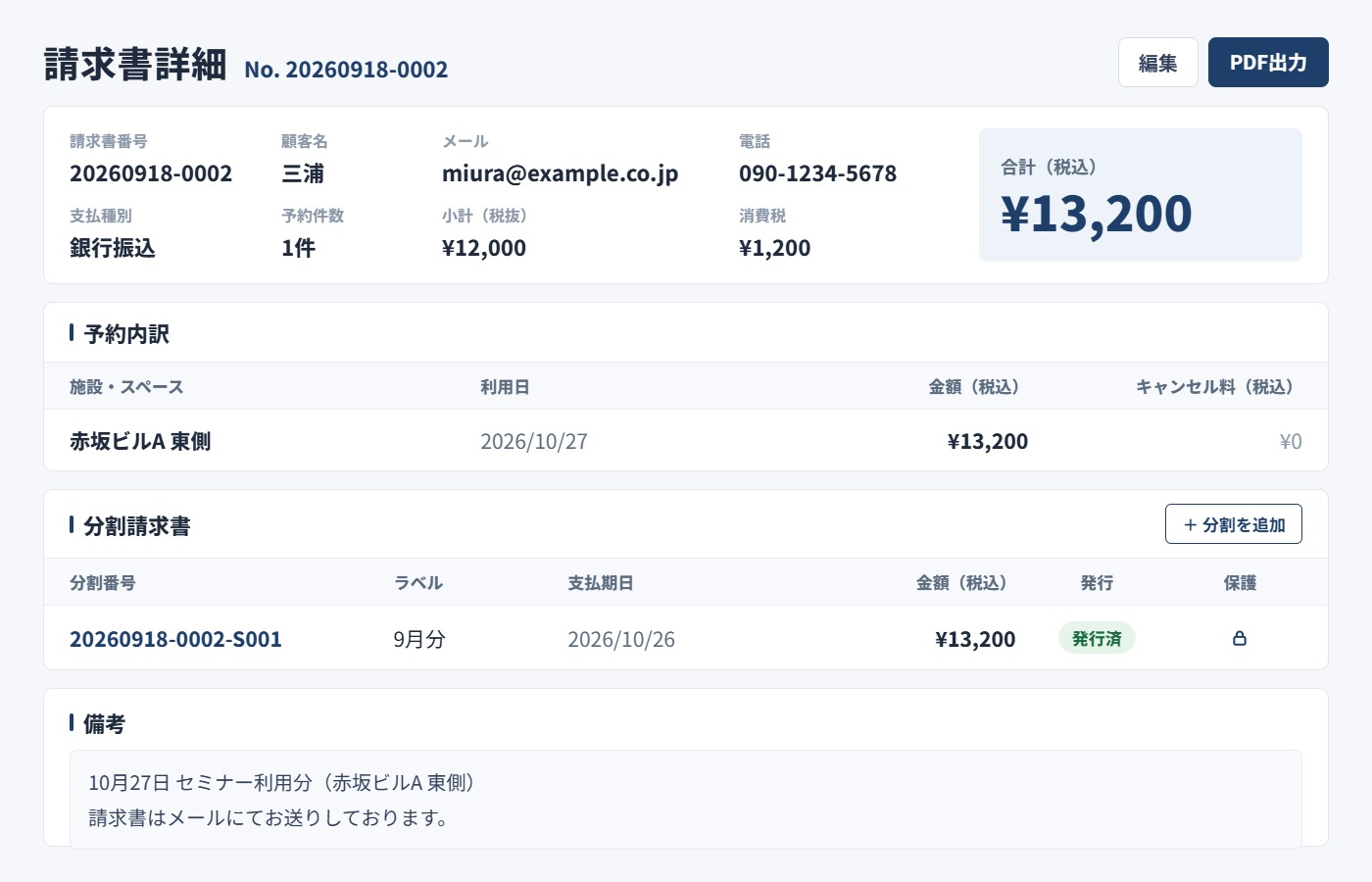
Automatic Invoicing

Supports QR codes and PDF export

Automatic invoicing icon

Invoices are generated automatically when a reservation is completed, with tax calculation and invoice numbering handled automatically.

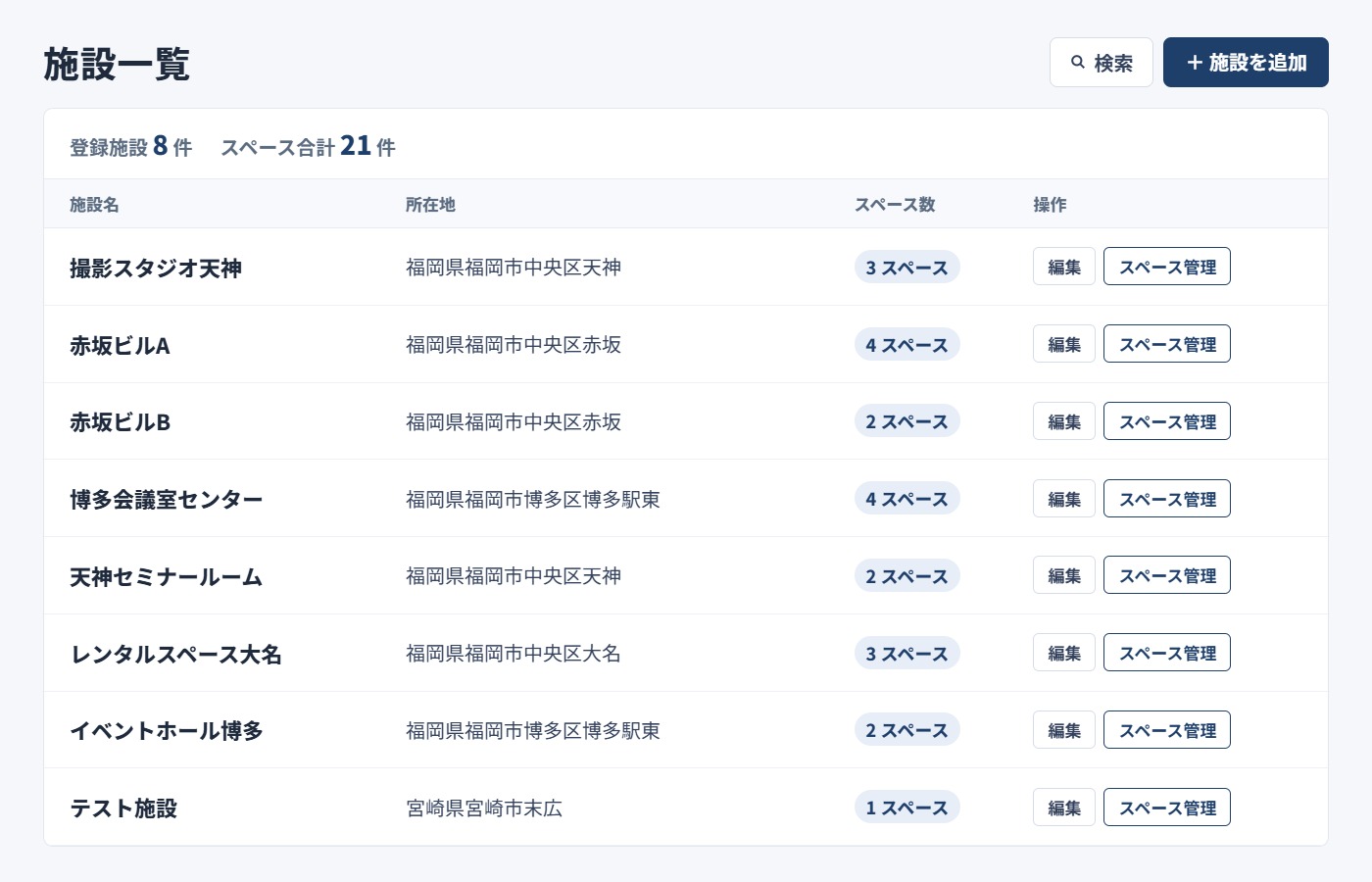
Hierarchical Management

Manage multiple facilities centrally

Hierarchical management icon

Supports complex facility structures with three levels: facility, space, and area.

Main Features

Hierarchical Facility Management

Manage facilities flexibly using a three-level structure: Facility → Space → Area. For example, within a facility called “Tokyo Head Office Building,” you can register multiple spaces such as “Meeting Room A,” “Meeting Room B,” and “Seminar Room,” then divide the seminar room into areas such as “Front Area” and “Rear Area” for separate rental. You can also register detailed information for each facility and space, including location, business hours, capacity, hourly rates, equipment, and multiple images.

Reservation Calendar

View reservation status by facility, space, or area in monthly and daily calendars. Automatic overlap checks prevent double bookings. You can easily set unavailable dates such as maintenance days and holidays. Both hourly and daily reservations are supported, with flexible start and end times or dates. Hourly charges are also calculated automatically.

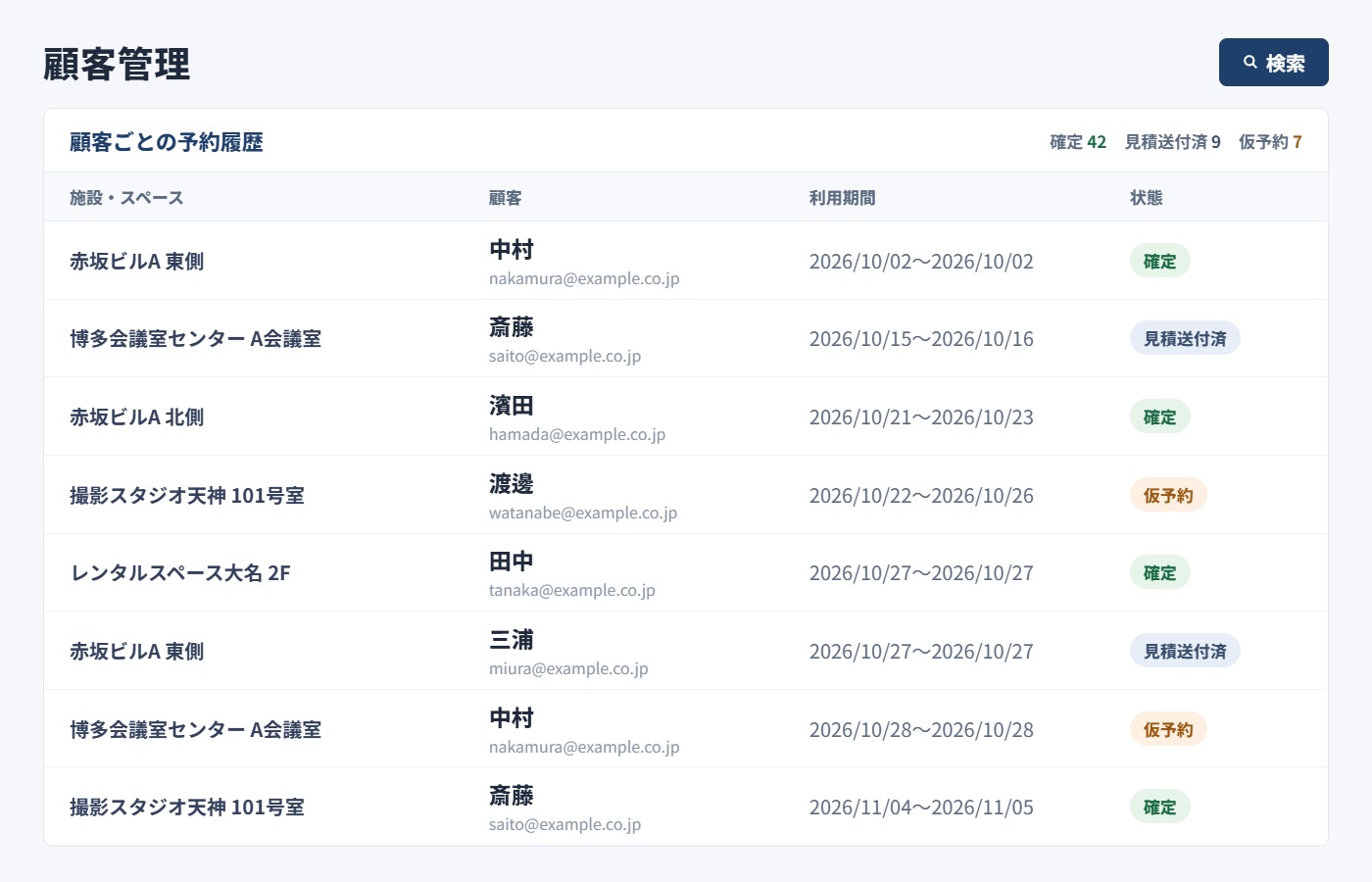
Customer Management

Centrally manage customer information such as name, email address, phone number, company name, and address. Reservation history is automatically linked to each customer, making it easier to serve repeat customers. LINE and email notification preferences can also be managed individually. With the invoice consolidation setting, multiple reservations from the same customer can be combined into a single invoice at the end of the month.

Automated Invoicing & Estimates

Invoices are generated automatically when a reservation is completed. Invoice numbers are assigned automatically in a format such as “INV-202501-0001.” The subtotal is calculated based on usage hours × hourly rate, and consumption tax (10%) is added automatically. A QR code is generated on each invoice for easy review and payment on a smartphone. Estimates can be issued in the same format, and PDF export is supported.

Automatic Notifications

Create and manage notification templates for events such as “Reservation Confirmation,” “Reservation Reminder,” “Reservation Cancellation,” “Payment Confirmation,” and “Customer Registration Complete.” Variables such as {{customer_name}}, {{facility_name}}, {{booking_date}}, and {{total_amount}} can be used and are automatically replaced with actual information when sent. Both email and LINE notifications are supported, helping automate customer communication.

Payment Management

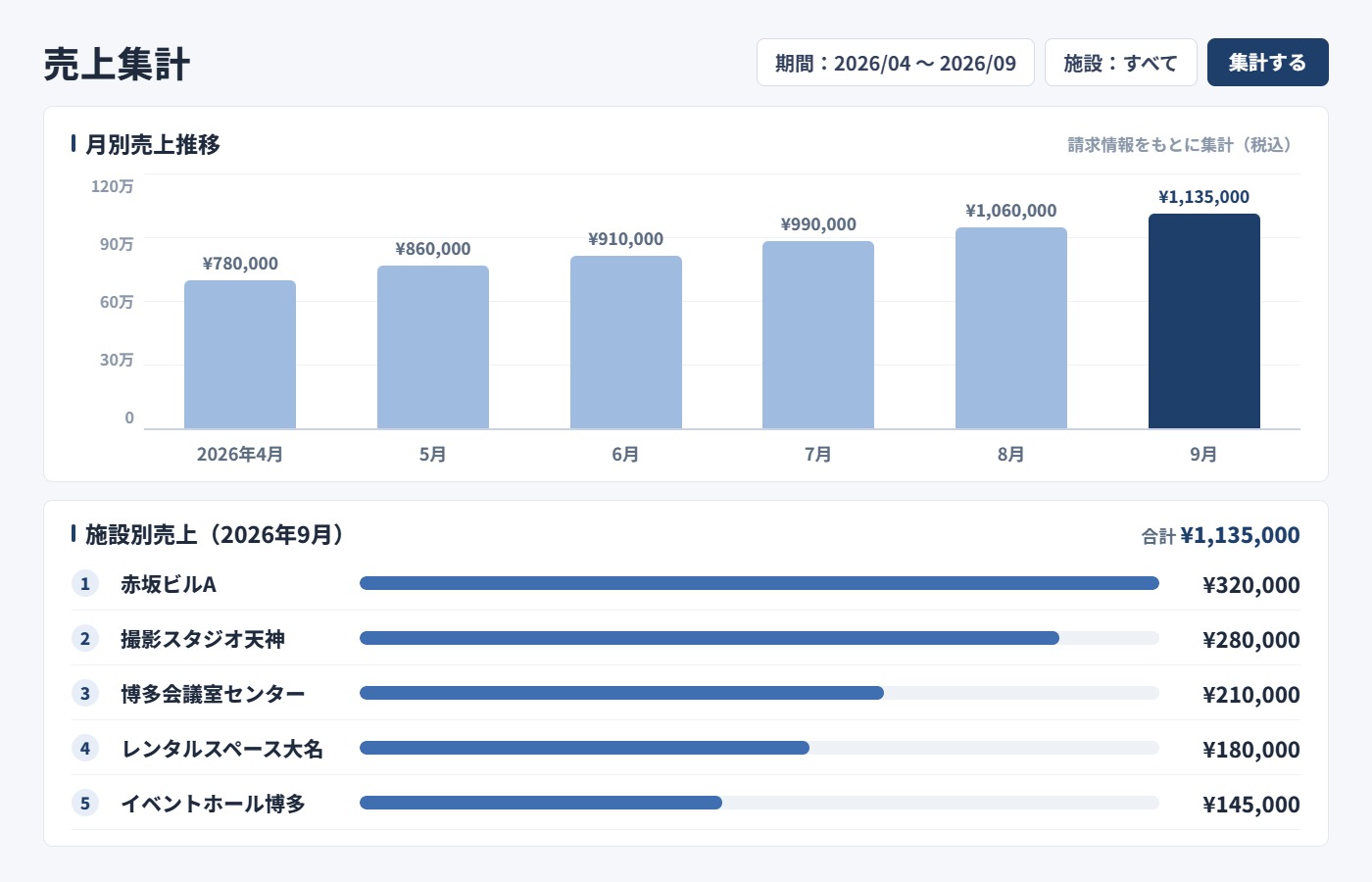
Manage the payment status of each reservation as “Unpaid,” “Partially Paid,” or “Paid.” Record payment dates, amounts, and methods, with support for split payments. The system automatically calculates the reservation total, amount paid, and remaining balance. Once payment is confirmed, a payment confirmation notification can be sent automatically. Unpaid reservations can be viewed in a list, and sales reports can summarize revenue by period.

Image Management

Upload multiple photos for each facility or space. Manage uploaded images in a dedicated gallery and copy each image URL with one click. Use the preview function to organize main visuals, interior photos, equipment images, and more. Images are securely stored and can be displayed automatically on the customer-facing website.

Data Export & Analysis

Export reservation, customer, and sales data in CSV format. Data can also be extracted for a specified period, making monthly and annual analysis easier. Sales reports automatically aggregate revenue by facility, space, and period. The exported data can be further processed in Excel for custom analysis and chart creation. Data is backed up regularly and stored securely.

PWA (Progressive Web App) Support

Add SHERPACE to a smartphone or tablet home screen and use it like a native app. No app store download is required; you can install it directly from your web browser. Offline support allows certain functions to remain available even with an unstable connection, and data is synchronized automatically once the device is back online. Both iOS and Android are supported.

Responsive Design

Automatically optimized for PCs, tablets, smartphones, and other screen sizes. Both the admin panel and customer-facing website work smoothly on any device. The smartphone interface is optimized for touch, making it easy to check reservations and perform management tasks while away from the office. The interface features a clean, modern design built with Tailwind CSS.

Sales Reports & Analysis

Automatically aggregate sales by day, month, facility, and space, and visualize the results in graphs. Specify a period to review sales trends, including monthly trends for the past 12 months. Reservation rankings and prefecture rankings help identify popular spaces and regional trends. Paid and unpaid amounts are also calculated automatically to support cash flow management, with CSV export available for more detailed analysis.

Bulk Messaging

Send messages to registered customers in bulk. Recipients can be automatically segmented into groups such as “All Customers,” “Customers Who Used the Service in the Last 3 Months,” “Customers Inactive for More Than 3 Months,” and “Newly Registered Customers.” Both email and LINE are supported, making it easy to send campaign information and announcements. Message history is stored so previous communications can be reviewed, supporting customer retention and repeat business.

Estimate Generation

Estimates can be generated automatically in the same way as invoices. Formal estimates can be issued during the inquiry stage before a reservation, helping customers make informed decisions. Estimates can also be converted smoothly into reservations, streamlining the sales process. Estimate numbers are assigned automatically for easy management.

Secure User Management

Includes permission management for administrator accounts. When multiple staff members use the system, appropriate permissions can be assigned to each user. Login authentication is securely encrypted to help prevent unauthorized access. Operation logs are also recorded, allowing you to track who performed each action and when.

Invoice Consolidation

The invoice consolidation setting allows multiple reservations from the same customer to be combined into a single invoice at the end of the month. This is ideal for corporate customers that prefer consolidated monthly billing. Details from multiple reservations are added to the consolidated invoice automatically, significantly streamlining the billing process.

Benefits

Reduce Reservation Handling Workload by 80%

Eliminate the need to handle reservations by phone or email. Customers can check availability and make reservations directly from the website, significantly reducing staff workload.

Accept Reservations 24/7 Without Staff

Accept online reservations even outside business hours or on holidays. Capture late-night and early-morning demand and reduce missed opportunities, even when staff are unavailable.

Prevent Double Bookings

The system automatically checks for overlapping reservations and prevents double bookings. Even when multiple staff members handle reservations at the same time, duplicate bookings for the same time slot are prevented, reducing both operational effort and stress.

Provide Smoother Service for Repeat Customers

Customer information and reservation history are linked automatically, making it easier to provide personalized service to returning customers. This helps improve customer satisfaction and encourage repeat business.

Eliminate Manual Invoice Creation

Invoices are generated automatically when reservations are completed, eliminating the need to create them one by one in Excel or Word. Automatic invoice numbering and tax calculations also help reduce errors.

An Intuitive UI New Staff Can Use Right Away

The visual calendar interface is intuitive and easy to use without a manual. This reduces staff training time and costs while making the system easy for anyone to use with confidence.

Low-Cost Setup and Operation

PWA support eliminates the need to develop a dedicated app, helping reduce setup costs. As a cloud-based system, there is no need for expensive server infrastructure. Updates and maintenance are handled automatically as part of the monthly service.

Recommended for These Facilities

Meeting Rooms
Meeting room image
Event Spaces
Event space image
Photo Studios
Photo studio image
Sports Facilities
Sports facility image
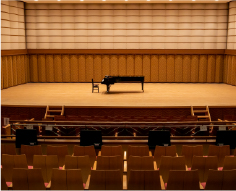
Halls & Theaters
Hall and theater image
Party Venues
Party venue image
Workshops
Workshop image
Streaming Studios
Streaming studio image

How to Get Started with SHERPACE

How to get started with SHERPACE: 01 Search for a meeting room, 02 Make a reservation on the SHERPACE website, 03 Confirm pricing, 04 Receive the key and start using the space, 05 Receive an invoice after use

Contact Us

Please feel free to contact us with any questions or inquiries.

Go to the Contact Form